External Devices
External devices are non-robot device such as conveyor, elevator, etc. External devices are implemented using BP (Blueprint) to allow easy editing by non-engineers. Each external device is a child class of BP_ExternalDeviceBase, which is a child class of RRBaseRobot. This setup provides ROS2Node and ROS2Interface functionalities.
External devices can be place from editor or spawned from ROS 2 /SpawnEntity .
Following devices only has basic setting such as primitive meshes as visual. It is expected that user create child class and change visual mesh, collision size and etc.
Base Class
Overview
Base class is parent class of other External Device BP classes and have common functionalities.
Base ROS Interfaces
UE external components have ROS 2 Interface which provide
- ROS2 Topic Interface: Two main interface based on modes
- Low level interface
e.g. velocity input and sensor
It allow user to create custom behavior of devices
- Preset action
e.g. move pallet from entrance A to entrance B
It allow user to test integration with just trigger action. It is also useful to speed up simulation since all logic inside UE.
- Parameters:
- Normal Parameters
e.g. velocity
Parameters which can be changed at runtime.
- Spawn Parameters
e.g. size, floor height
Parameters which can’t be changed after spawn. Pose and ROS namespace are includes as ue_msgs/SpawnEntity.srv.
Base UE functions
- ParamParser and ParamParserImpl:
These handle JSON parameter parsing. When spawned from ROS, ParamParser is called from BPInitParamParser. When spawned from Unreal Engine (UE), such as when placed from the editor, ParamParser is called from the Initialize function. It is expected that parameters will be overwritten by the editor as normal UE Actors.
- InitializeChildActor:
Some external devices contain other devices as child actors. For example, a vertical conveyor may have an elevator and conveyors as child actors. The initialization of these child actors, such as passing parameters and setting relative positions, is performed here.
- Construction Script:
The construction script calls three functions: 1. InitializeChildActor 2. Initialize 3. PostInitialize
Parameters for BP_ExternalDeviceBase
Param Name |
Type (Default) |
Note |
|---|---|---|
ROS JSON SPAWN PARAMETER |
||
/debug |
bool (false) |
Mainly used to print debug logs. |
/mode |
int (0) |
Modes such as manual or automatic. |
/disable_physics |
bool (true) |
Disables physics of the target object during operation. |
/size |
dict {x:1, y:1, z:1} |
Scale of the external device. |
BP PARAMETER |
||
ParseParamFromJSON |
bool (true) |
Parse parameters from JSON. |
DebugParamParser |
bool (false) |
Used for debugging the JSON Param Parser. |
TestJsonInput |
string (‘’) |
Test JSON input for debugging. |
Conveyor
Overview
The conveyor has collision meshes set to OverlapAll. It moves objects with a given velocity that overlap with the meshes.
There are two main conveyor types:
BP_Conveyor: A simple straight conveyor.
BP_SplineConveyor: A conveyor that moves along a spline curve.
The conveyor can be controlled by velocity input and has two sensors to detect objects.

Figure : Conveyor
Conveyor Parameters
Param Name [UE name if it is not pascal case of ROS one] |
Type (Default) |
Note |
|---|---|---|
ROS JSON SPAWN PARAMETER |
||
/mode |
int32 (0) |
|
/sensor1_transform |
|
Relative transform of sensor1. |
/sensor2_transform |
|
Relative transform of sensor2. |
|
float (1.0 m/s) |
Conveyor speed. |
|
float (0.1 m) |
Sensor area length. |
|
|
Spline points for curve creation. |
BP PARAMETER |
||
Tag |
string (‘Payload’) |
Actors with this tag are conveyed. |
ROS 2 API for Conveyor
Topic Name |
Msg Type |
Note |
|---|---|---|
SUBSCRIBE |
||
/set_vel |
Conveyor speed. Can be positive or negative. |
|
/set_mode |
Sets mode: 0: Move until payload exits area 1: Move until it hits the entrance sensor. |
|
PUBLISH |
||
/entrance |
Size = 2. 0: No object, 1: Object detected. |
Elevator
Overview
Elevators consist of containers that move between floors. The containers can have doors and conveyors inside to automatically move payloads.
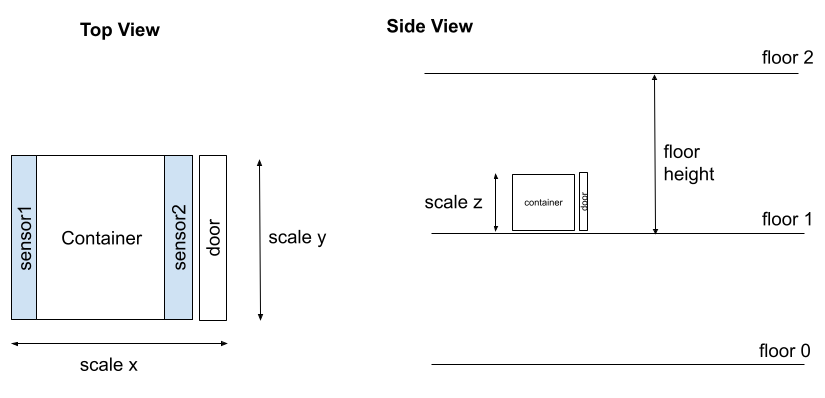
Figure : Elevator
Elevator Parameters
Param Name [UE name if it is not pascal case of ROS one] |
Type (Default) |
Note |
|---|---|---|
ROS JSON SPAWN PARAMETER |
||
/mode |
int (1) |
|
/floor_height |
float (5.0 m) |
Floor height. |
/floors |
int [2]([0, 1]) |
Floor numbers. |
|
bool[2] ([true, false]) |
Door presence. |
|
bool (true) |
Door presence. |
|
float (0.3 m/s) |
Door speed. |
/initial_floor |
int (0) |
Initial floor. |
/auto_target_floors |
int [2]([0, 1]) |
Auto mode target floors. |
|
float (3.0 m/s) |
Elevator speed. |
ROS 2 API for Elevator
Topic Name |
Msg Type |
Note |
|---|---|---|
SUBSCRIBE |
||
/set_mode |
|
|
/set_vel |
|
|
/set_front_door_vel |
|
|
/set_back_door_vel |
|
|
/set_door_vel |
|
|
/open_door |
Opens or closes the doors. |
|
/move_to |
Close door, move to the specified floor and open door. |
|
/set_auto_target_floors |
Set the target floors for auto mode. |
|
PUBLISH |
||
/current_floor |
Current floor. If the floor is moving, it will show the last known floor. |
|
/door_status |
Door status. True = open, False = closed. |
|
SERVICE |
||
/get_door_status |
Returns whether the door is open or not. |
|
/get_current_floor |
Returns the current floor. |
|
/move_to |
Close door, move to the specified floor and open door. |
|
/open_door |
Opens or closes the doors. |
- Todo
Support multiple type of doors
Multiple door location for each floor
Test spawning from ROS 2.
Vertical Conveyor
Overview
The vertical conveyor is a combination of a conveyor and an elevator. It allows for the vertical transport of payloads between multiple levels, and each level can have its own entrance and exit conveyors.

Figure : Vertical Conveyor
Vertical Conveyor Parameters
Param Name |
Type (Default) |
Note |
|---|---|---|
ROS JSON SPAWN PARAMETER |
||
/floor_height |
float (10 m) |
Distance between floors. |
/entrances |
int32 [4]([false, true, false, true]) |
Define if each entrance is active. 0. no entrance, 1. entrance active. |
/target_entrance |
int8 [2]([0, 1]) |
Target entrance, [in, out]. |
/elevator |
string (‘’) |
JSON spawn parameter to pass to the child elevator actor. |
/entrance |
string (‘’) |
JSON spawn parameter to pass to child entrance conveyor actors. |
BP PARAMETER |
||
EntranceActorClass |
ActorClass(BP_Conveyor) |
Entrance conveyor class |
ROS 2 API for Vertical Conveyor
Topic Name |
Msg Type |
Note |
|---|---|---|
/set_target_entrance |
Sets the target entrance, [in, out]. |
- Todo
Support different parameter settings for each entrance.
Test spawning from ROS 2.
Mobile Rack
Overview
The mobile rack is a combination of rack units. User can move unit racks to make path for robot.

Figure : Mobile Rack
Rack Unit Parameters
Param Name |
Type (Default) |
Note |
|---|---|---|
ROS JSON SPAWN PARAMETER |
||
/layer_num |
int (4) |
Number of Rack layers. |
/layer_height |
float (2m) |
Height of each layer. |
/plate_num |
vector2d ({x: 1, y: 2}) |
Number of plate in each layer. |
/plate_dim |
vector ({x: 1.5, y: 2.5, z: 0.1}) |
Plate dimension. |
/plate_spacing |
vector2d ({x: 0.2, y: 0.0}) |
Spacing between plates. |
/spot_num_per_plate |
int (2) |
Number of spots in each plate. Spot can be used as a target for pick/drop. |
/spot_spacing_from_plate_edge |
float (0.65m) |
Spacing between spot and plate edge. |
/has_approach_spot |
dict {Front: true, Rear: true} |
Approach spot presence. Spot can be used as a target for robot movement. |
/approach_distance |
dict {Front: 1.5, Rear: 1.5} |
Approach spot distance from the rack. |
/has_mesh |
dict {Foot: true, Side: true, Back: true} |
Mesh presence. |
/meshe |
dict {Plate: None, Pillar: None, Foot: None, Side: None, Back: None} |
Meshes for each part. If it is None, default shape is created with primitives. (* not supported to set from ROS yet.) |
/material |
string(‘None’) |
Material for each part. If it is None, default material is used. (* not supported to set from ROS yet.) |
/has_bottom_layer |
bool (true) |
Bottom layer presence. |
/has_collision |
bool (true) |
Collision presence. This collision is used to move payload when rack is moving. This should be true for unit rack of mobile rack. |
/allow_path_bottom |
bool (false) |
Allow path from bottom. If true, robot can pass through the bottom of the rack. |
Mobile Rack Parameters
Param Name |
Type (Default) |
Note |
|---|---|---|
ROS JSON SPAWN PARAMETER |
||
/unit_num |
int (3) |
Number of Rack Units. |
/unit_spacing |
float (0.2m) |
Spacing between rack units. |
/path_width |
float (3.5m) |
Path width |
/begin_edge |
bool (true) |
Begin edge presence |
/end_edge |
bool (true) |
End edge presence |
/initial_path_index |
int (0) |
Initial path index. |
/speed |
float (m/s) |
moving speed of rack units. |
/unit_rack_param |
Json(Rack Unit Parameters) |
Rack parameter |
/begine_edge_rack_param |
Json(Rack Unit Parameters) |
Begin Edge Rack parameter |
/end_edge_rack_param |
Json(Rack Unit Parameters) |
End Edge Rack parameter |
ROS 2 API for Mobile Rack
Topic Name |
Msg Type |
Note |
|---|---|---|
SUBSCRIBE |
||
/open |
Open path at index. |
|
PUBLISH |
||
/path |
Current path index. If racks are moving, it will be -1 |
- Todo
Test spawning from ROS 2.