AI Character/Robot
AI Overview
AI Character/Robot is an actor controlled via BP_ROSAIController. It has preset movements such as pick, drop, and navigation and those movement can be triggered from both BP and ROS 2. The primary purpose of these actors is to simulate humans, non-robot components such as manually controlled forklifts, or off-the-shelf robots that you won’t develop but exists in the environment. These actors help simulate robot interactions with dynamic objects in environments like warehouses.
Basic AI functionality such as pick/drop/move is implemented via behavior tree in BP_RRROSAIController. The main reason to implement logic in controller instead of actor is to support both child class of RRBaseRobot and Character.
RRAIRobotROSController is parent class of BP_RRROSAIController which has implementention of UE navigation system movement functionality in C++. Those primitive API’s are used from behavior tree in BP_RRROSAIController.
BP_RRAIBaseRobot and BP_ROSSimpleCharacter uses BP_ROSAIController as controller. It is expected to overwrite function/behavior in those child actor classes to implement custom pick/drop/etc actions.
*Following video are examples in rclUE-Examples and UEROSAssets repositories.
*Please check LevelBP of Warehouse Map in rclUE-Examples for how to control AI character/robot from UE
*Please check warehouse_client.py in rclUE_client_examples for how to control AI character/robot from ROS 2
Video: Warehouse Sim
Basic Behaviors
AI characters can move using two methods:
- UE Navigation System Movement:
Utilizes Unreal Engine’s navigation system, requiring a navigation mesh in the map.
- Direct Movement:
Uses SetActorLocation and SetActorRotation for linear and rotational movement, often for tasks such as picking up or dropping objects.
Combination Behaviors
Video: Forklift Pick/Drop From ROS
Video: Character Pick/Drop From ROS
*Video: Character SEQUENCE, RANDOM_SEQUENCE, RANDOM_AREA.
*Video: SPLINE_PATH
*Video: SPLINE_PATH from ROS
- Auto Movement:
The robot can move randomly or sequentially through predefined goal sequences, or move randomly within a defined area.
MANUAL: Not automatically move until get command from BP or ROS.
SEQUENCE: Moves repeatedly through a given GoalSequence.
RANDOM_SEQUENCE: Selects a random destination from GoalSequence.
RANDOM_AREA: Selects random destinations within a specified bounding box.
SPLINE_PATH: Moves along a spline path. SPLINE_PATH is implemented in BP_RRROSAIController and not in RRROSAIController
Please check rclUE_client_example as well.
- Pick/Drop:
Combines UE navigation system movement with direct movement (forward/backward) to approach or depart from the target payload or point, lifting up or down, and attaching or detaching the object. There is also an option to move to another approach location before moving to the target location, which helps pawn to approach the target from specific direction.
- General Action:
A virtual event that can be customized in child classes. The action is triggered by a JSON string argument and allows for flexible custom behavior.
Behavior Trees
BT_ROS2Agent BT_ROS2Agent is a base behavior tree that switches between navigation, pick, drop, and general actions. In the navigation part, it switches Auto Movement modes depending on the current mode. In the pick/drop part, it includes sub-behavior trees in PickImpl/DropImpl, which are set in the PickImplBehavior/DropImplBehavior variables of BP_RRROSAIController.
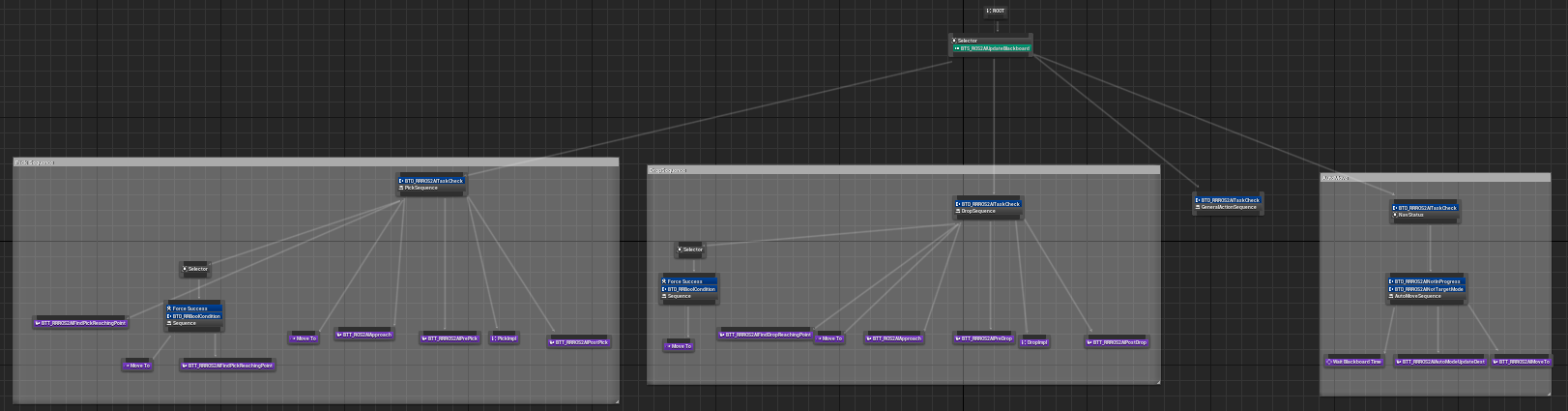
ROS2Agent Behavior tree
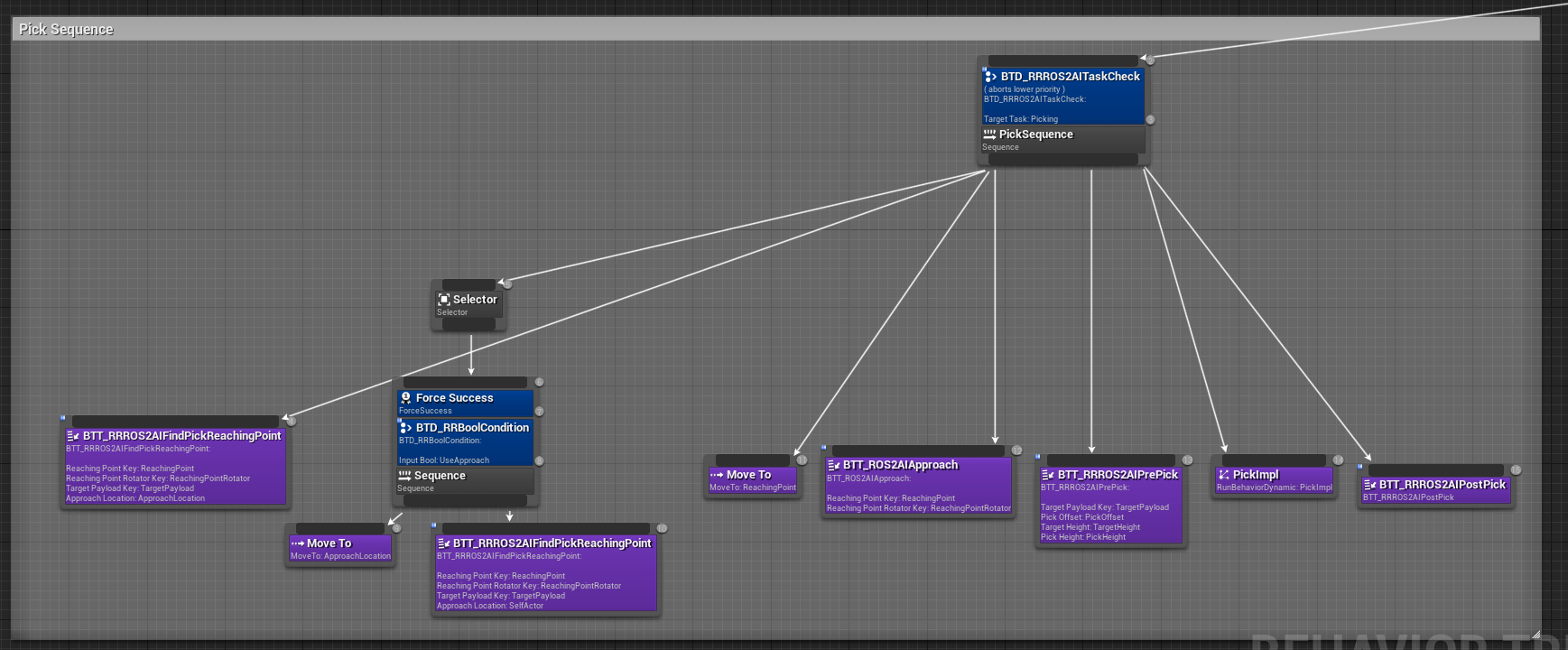
Pick action part of ROS2Agent Behavior tree
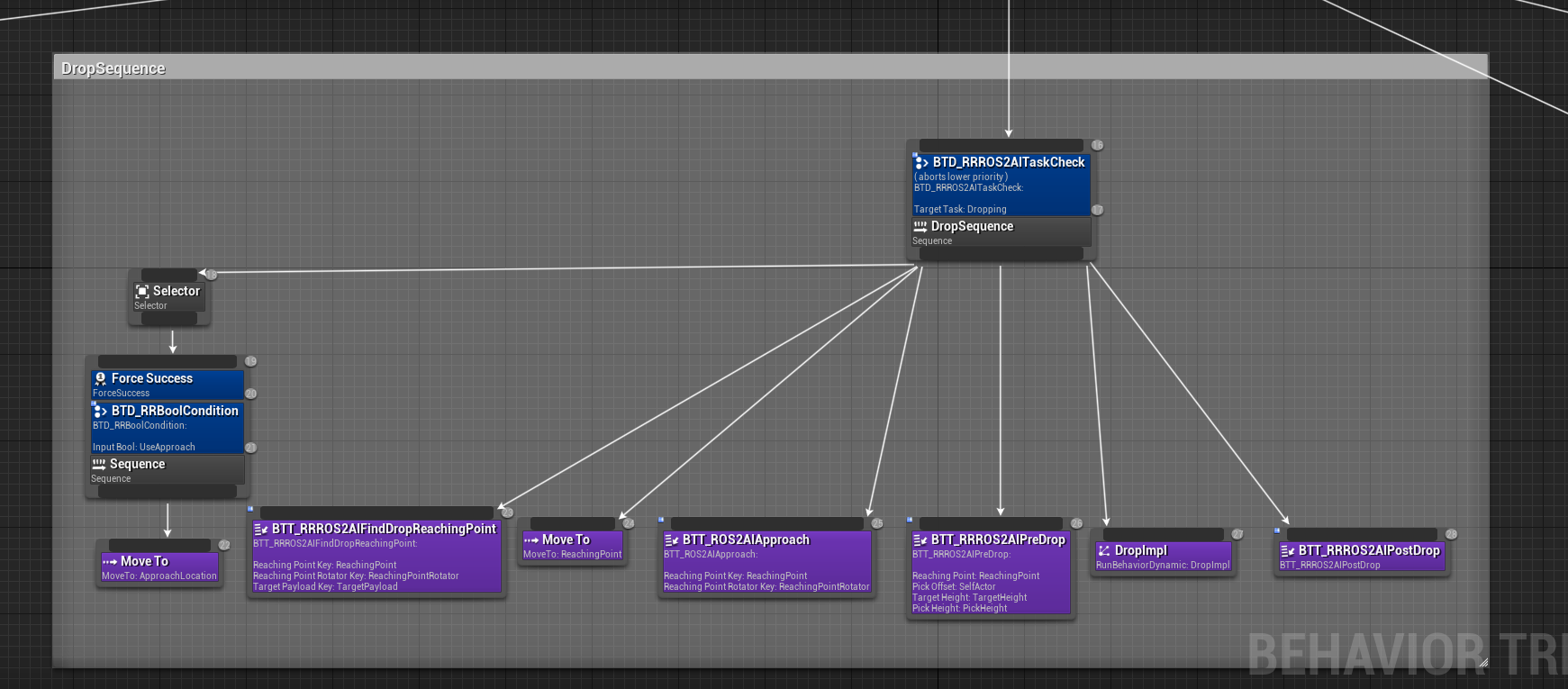
Drop action part of ROS2Agent Behavior tree
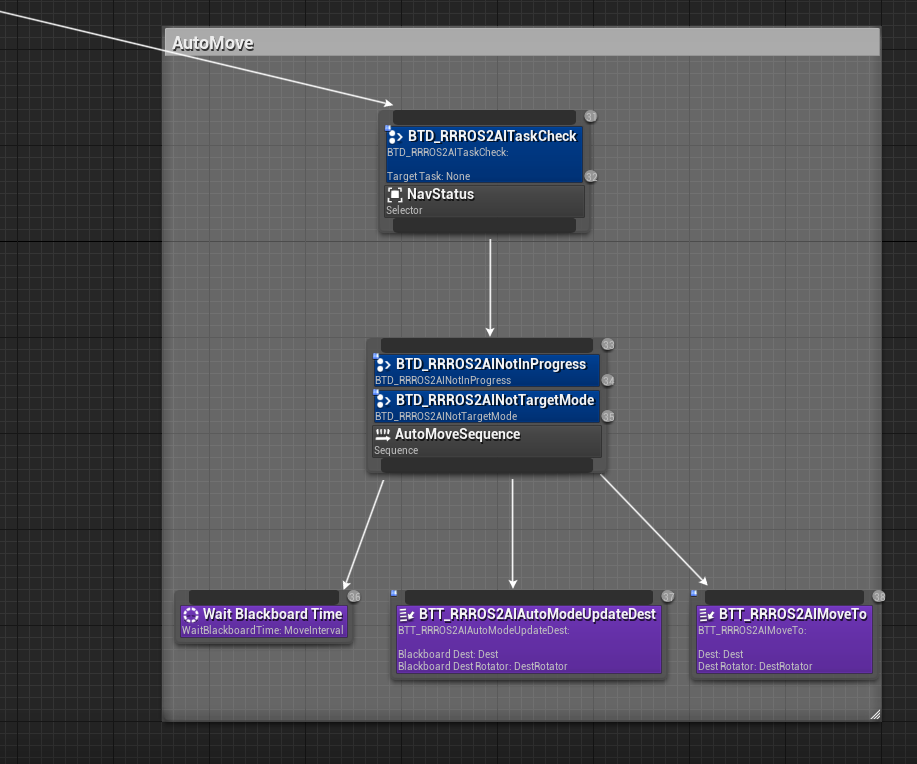
Navigation movement part of ROS2Agent Behavior tree
BT_ROS2RobotPick/BT_ROS2RobotDrop These are the default sub-behavior trees used for PickImpl/DropImpl actions.
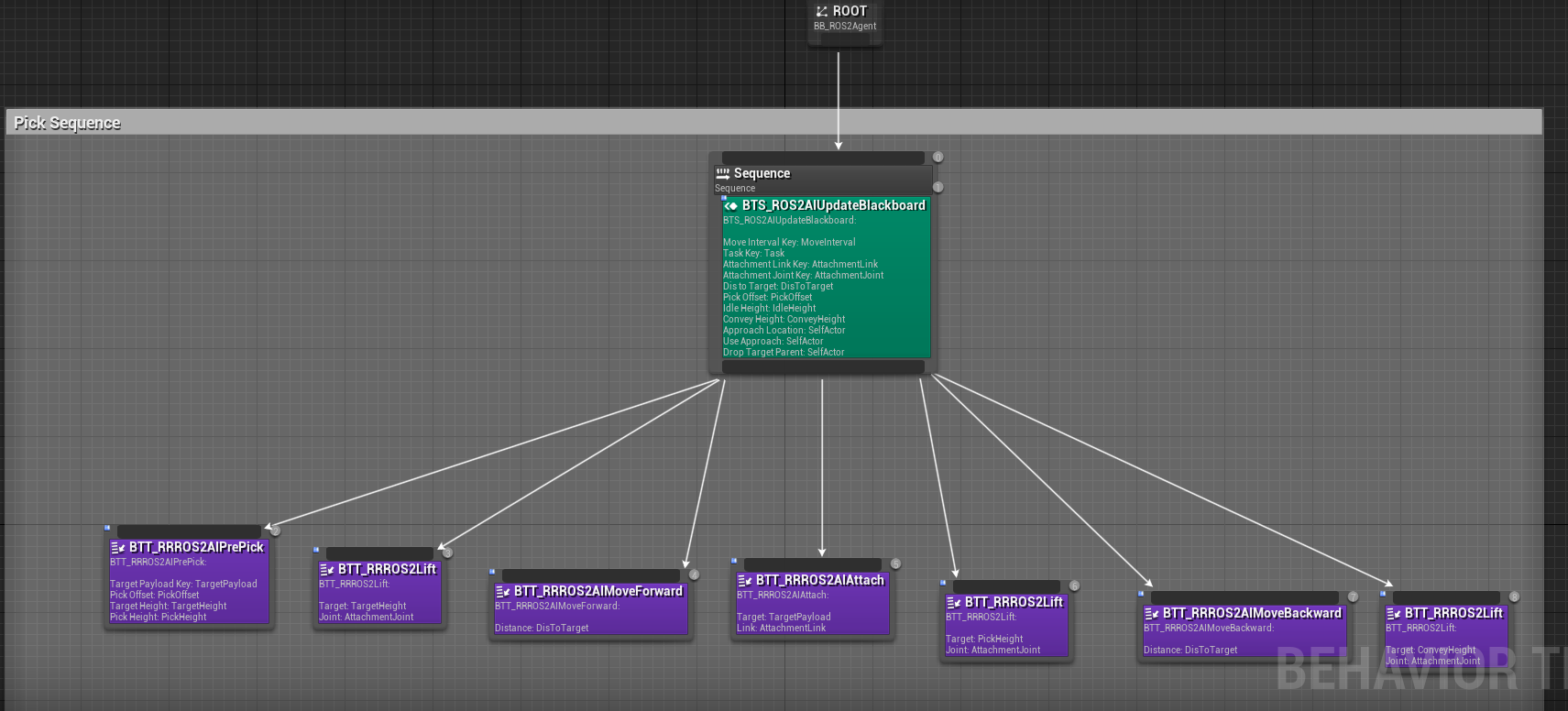
Pick sub tree
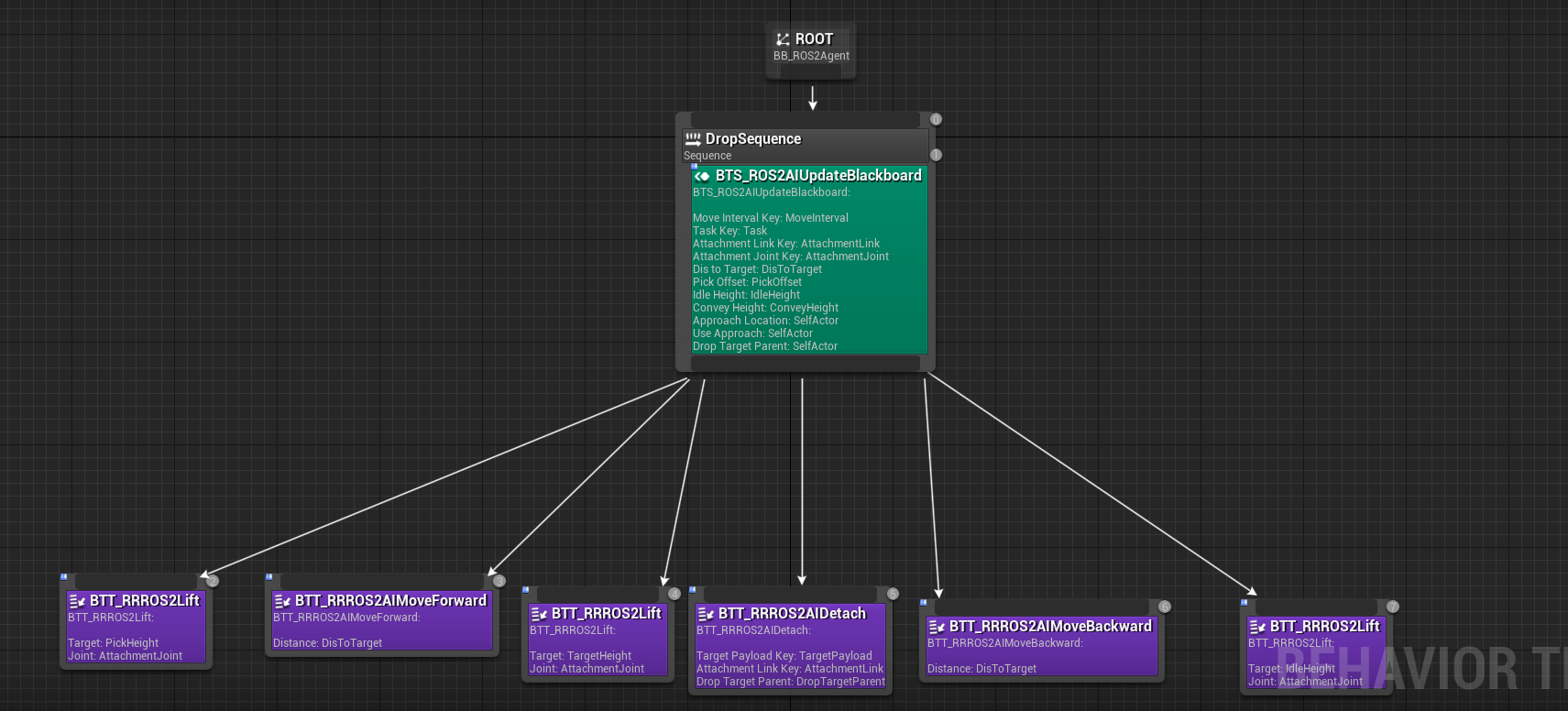
Drop sub tree
AI Controller
RRAIRobotROSControllerParam
RRAIRobotROSControllerParam is a UActorComponent which has parameters for basic navigation functionality for RRAIRobotROSController. If controlled pawn has child class of RRAIRobotROSControllerPara, the param is passed to the controller when the pawn is possed.
RRAIRobotROSController
RRAIRobotROSController contains basic movement functionality in C++. It supports movement using Unreal Engine’s navigation system and allows for direct linear and rotational movement via SetActorLocation and SetActorRotation. Additionally, it provides a basic ROS 2 interface for external control.
Parameters for RRAIRobotROSController
Param Name |
Type (Default) |
Note |
|---|---|---|
ROS JSON SPAWN PARAMETER |
||
/debug |
bool (false) |
Enables debug logging. |
/mode |
int32 (0) |
Defines movement mode: 0. Manual 1. Sequential loop movement through GoalSequence 2. Random through GoalSequence 3. Random area movement which defined with origin and random_move_bounding_box |
/speed |
float (depends on movecomponent) |
Linear moving velocity. it is paassed to movecomponent |
/angular_speed |
float (depends on movecomponent) |
Angular velocity. it is passed to movecomponent |
/acceleration |
float (depends on movecomponent) |
Linear acceleration velocity. it is passed to movecomponent |
/acceptance_radius |
float (10 cm) |
Radius within which the robot considers the target reached. |
/orientation_tolerance |
float (5°) |
Angular tolerance for completing navigation. |
/random_move_bounding_box |
vector({x:1, y:1, z:1}) |
Bounding box used with mode=RANDOM_AREA |
/origin |
transfor or string(nullptr) |
Origin used with mode=RANDOM_AREA. If it is string, acotor with name is used as origin |
/goal_sequence |
transform[]([]) |
Goal sequences which is uses with mode=SEQUENCE or RANDOM_SEQUENCE |
ROS 2 API for RRAIRobotROSController
Topic Name |
Msg Type |
Note |
|---|---|---|
SUBSCRIBE |
||
/pose_goal |
Sets a navigation goal for the robot. |
|
/actor_goal |
Sets a navigation goal based on an actor’s name. |
|
/set_mode |
|
|
/set_speed |
Adjusts the robot’s linear speed. |
|
/set_angular_speed |
Adjusts the robot’s rotational speed. |
|
PUBLISH |
||
/nav_status |
|
BP_RRAIRobotROSControllerParam
BP_RRAIRobotROSControllerParam is child class of RRAIRobotROSControllerParam and has additional parameter such as BP_RRROS2AIControllerSplineParam.
BP_RRROS2AIControllerSplineParam
BP_RRROS2AIControllerSplineParam is a parameters for spline movement in BP_RRROSAIController.
Param Name |
Type (Default) |
Note |
|---|---|---|
Debug |
bool (false) |
Enables debug logging. |
Mode |
int32 (0) |
Defines movement mode: 0. OneTime: Move along spline one time adn stop at the end. 1. LoopFromStart: Move along spline and navigate/teleport to start point when it reach end of spline and repeat movement. 2. Reverse: Move along spline and reverse direction when it reach end/start of spline. |
FindClosestSpline |
bool (false) |
If true, it will find the closest BP_SplinePath from the current location. |
LookAheadDistance |
float (0.1) |
Distance to look ahead on the spline. Closest spline point from Current location + LookAheadDistance is used as target to mvoe. |
Reverse |
bool (false) |
If true, it will move in reverse direction of spline |
TeleportToSpline |
bool (false) |
If true, controlled pawn will teleport to the closest spline point, otherwise controller use naviagation to move to the spline point. |
KeepInitialHeight |
bool (false) |
Keep initial controlled pawn height when moving along spline. |
DeleteSplineAfterOneTime |
bool (false) |
If true, spline will be deleted after one time movement along spline. It is mainly used to use spline following from ROS 2. |
BP_RRROSAIController
BP_RRROSAIController is a child class of RRAIRobotROSController and has implementation for pick, drop, and other actions in addition to actor movements. These actions are implemented in a behavior tree, and can be customized via the behavior tree in child classes.
Pick/Drop actions include an optional parameter for approaching a location before starting the pick/drop action. This allows the actor to approach the target object from a specific direction.
If the target payload is a child class of BP_PayloadBase, the defined approach locations in BP_PayloadBase can also be used.
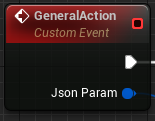
The general action is an interface to execute actions specific to the actor. The argument to the general action is a JSON string, which is parsed and the action is implemented in child classes.
BP_RRROSAIController also support spline following movement as well.
BP Parameters for BP_RRROSAIController
Param Name |
Type (Default) |
Note |
|---|---|---|
PickImplBehavior |
Behavior tree |
Sub-behavior tree used from PickImpl in BT_ROS2Agent. |
DropImplBehavior |
Behavior tree |
Sub-behavior tree used from DropImpl in BT_ROS2Agent. |
BP_RRROSAIController UE API
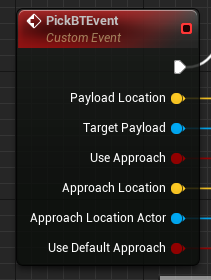
|
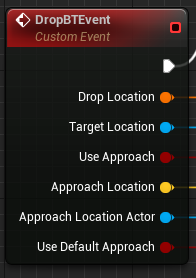
|
|
Function Name |
Input |
Type |
Description |
|---|---|---|---|
PickBTEvent |
PayloadLocation |
vector |
This or TargetPayload is used to find the pick target. The target is searched within a threshold from this location. |
TargetPayload |
Actor |
This or PayloadLocation is used to find the pick target. |
|
UseApproach |
bool |
Whether to use approach before starting the pick. |
|
ApproachLocation |
vector |
This or ApproachLocationActor is used as the navigation goal before starting the pick. |
|
ApproachLocationActor |
actor |
This or ApproachLocation is used as the navigation goal before starting the pick. |
|
UseDefaultApproach |
bool |
If true and TargetPayload is a child class of BP_PayloadBase, the defined approach location in PayloadBase will be used as the approach location. |
|
DropBTEvent |
DropLocation |
vector |
This or TargetLocation is used to decide the drop target location. |
TargetLocation |
Actor |
This or DropLocation is used to decide the drop target location. |
|
UseApproach (for drop) |
bool |
Whether to use approach before starting the drop. |
|
ApproachLocation |
vector |
This or ApproachLocationActor is used as the navigation goal before starting the pick. |
|
ApproachLocationActor |
actor |
This or ApproachLocation is used as the navigation goal before starting the pick. |
|
UseDefaultApproach |
bool |
If true and TargetPayload is a child class of BP_PayloadBase, the defined approach location in PayloadBase will be used as the approach location. |
|
General Action |
JsonParam |
string |
The string should be in JSON format and parsed in each child class to implement custom behavior API. |
ROS 2 API for BP_RRROSAIController
Topic Name |
Msg Type |
Note |
|---|---|---|
SUBSCRIBE |
||
/pick_goal |
Triggers PickBTEvent with PayloadLocation. |
|
/pick_actor_goal |
Triggers PickBTEvent with TargetPayload. |
|
/drop_goal |
Triggers DropBTEvent with DropLocation. |
|
/drop_actor_goal |
Triggers DropBTEvent with TargetLocation. |
|
/set_approach_location |
Sets ApproachLocation for PickBTEvent and DropBTEvent. |
|
/set_approach_location_actor |
Sets ApproachLocationActor for PickBTEvent and DropBTEvent. |
|
/set_use_default_approach |
Sets UseDefaultApproach for PickBTEvent and DropBTEvent. |
|
/general_action |
Triggers the general action. |
|
PUBLISH |
||
/task_status |
Publishes the current task status: 0. None 1. Picking 2. Dropping 3. GeneralAction. |
AI Pawn
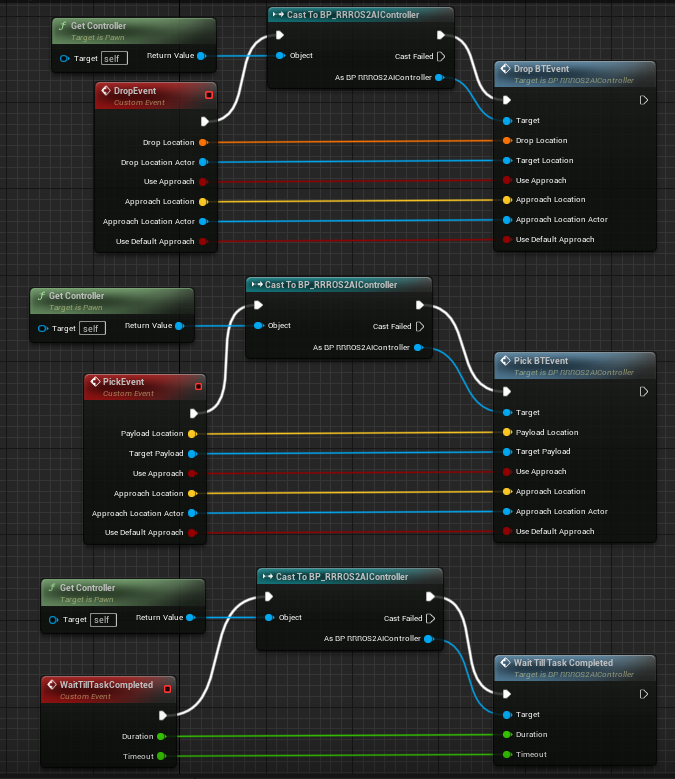
AI Character/Robot is a actor which is controlled by RRAIRobotROSController. Since most of AI feature is implemented in RRAIRobotROSController, actor class mainly just has bridge api to call controller interfaces.
General action is a interface to execute action specific to the actor. Argument to general action is Json string and expected to be parsed and action implemented in child
UE API which bridge to BP_RRAIRobotROSController
BP_RRAIBaseRobot
BP_RRAIBaseRobot is a child class of RRBaseRobot and has a bridge interface to RRAIRobotROSController. It provides basic movement and pick/drop functionality, along with the ability to customize general actions.
Example child classes are available in the rclUE-Examples and UEROSAssets repositories. The warehouse map in rclUE-Examples includes examples of BP_CounterFork and BP_Track.
BP_CounterFork: Demonstrates pick/drop actions.
BP_Track: Implements general actions, such as opening/closing containers via general_action.
BP_ROSSimpleCharacter
BP_ROSSimpleCharacter is a child class of Character and interfaces with RRAIRobotROSController. It provides customizable behavior, actions, and animation control for AI robots or workers in Unreal Engine environments.
Example child classes are available in the rclUE-Examples and UEROSAssets repositories. The warehouse map in rclUE-Examples includes BP_ROSCharacter.
BP_ROSCharacter is a child class of BP_ROSSimpleCharacter. BP_ROSCharacter is example of implement custom ROS enabled character.
Custom Pick/Drop Behavior: Demonstrated in BT_ROSCharacterPick and BT_ROSCharacterDrop.
Custom Animations: Animation Blueprints such as ABP_RRManny and SKM_Manny_CtrlRig are used to control animations during pick/drop actions.
Payload Interaction: BP_CharacterPayloadBox has PickHandles for grasping and handles for determining the direction for payload placement.
It is expected that users will create child classes to override behavior, animations, and meshes as needed for specific use cases.